CapCut vs DaVinci Resolve 2026: Which Video Editor Should You Choose?
CapCut is fast and template-rich for short videos; DaVinci Resolve is powerful, free and watermark-free for long videos and color work.
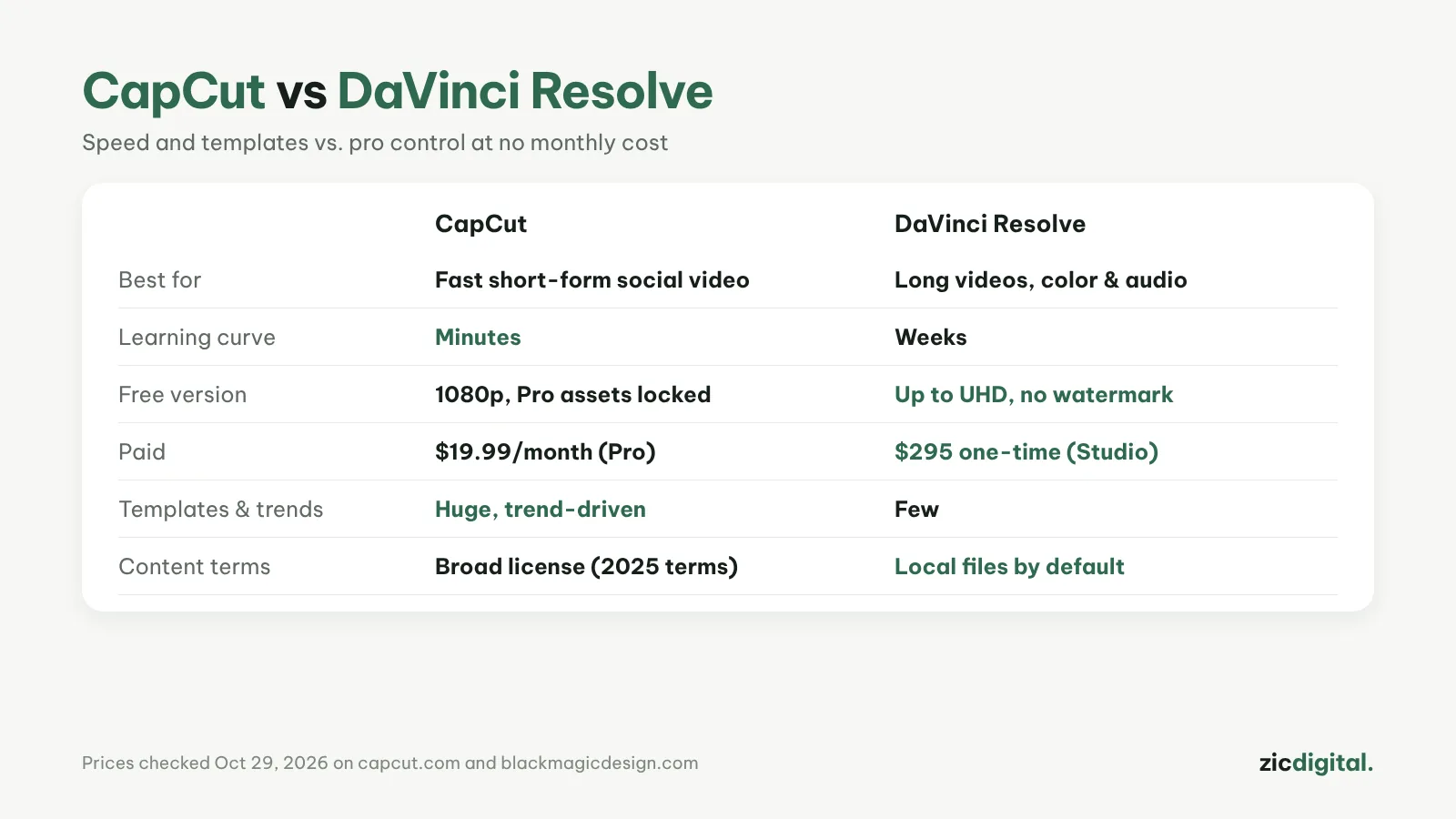
Choose CapCut if
- You make Shorts, Reels or TikToks and need them done fast
- You want ready-made trendy templates and effects
- You're new to video editing
Choose DaVinci Resolve if
- You make long YouTube videos and care about color and audio
- You want a free, watermark-free version that exports up to Ultra HD
- You don't want a monthly fee
Cost
CapCut Pro costs $19.99/month. DaVinci Resolve is free; Studio is a $295 one-time purchase (on sale for $236 on the official page on October 29, 2026). After about 15 months, Studio costs less than paying for CapCut Pro monthly.
Data and terms
DaVinci Resolve works with files on your own computer by default. CapCut's 2025 terms grant broad rights over uploaded content, which matters if you edit client videos.
Verdict
Many creators use both: CapCut for short clips, DaVinci Resolve for long videos. Read more: CapCut review · DaVinci Resolve review