Google Flow vs CapCut 2026: Make AI Video in Flow or Right Inside CapCut?
CapCut now offers many video models (Veo 3.1, Seedance, Kling, Dream Machine) inside the editor, with 1,200 AI credits on Pro at $19.99; Google Flow is Google’s own AI filmmaking tool, included in AI Pro at the same price.
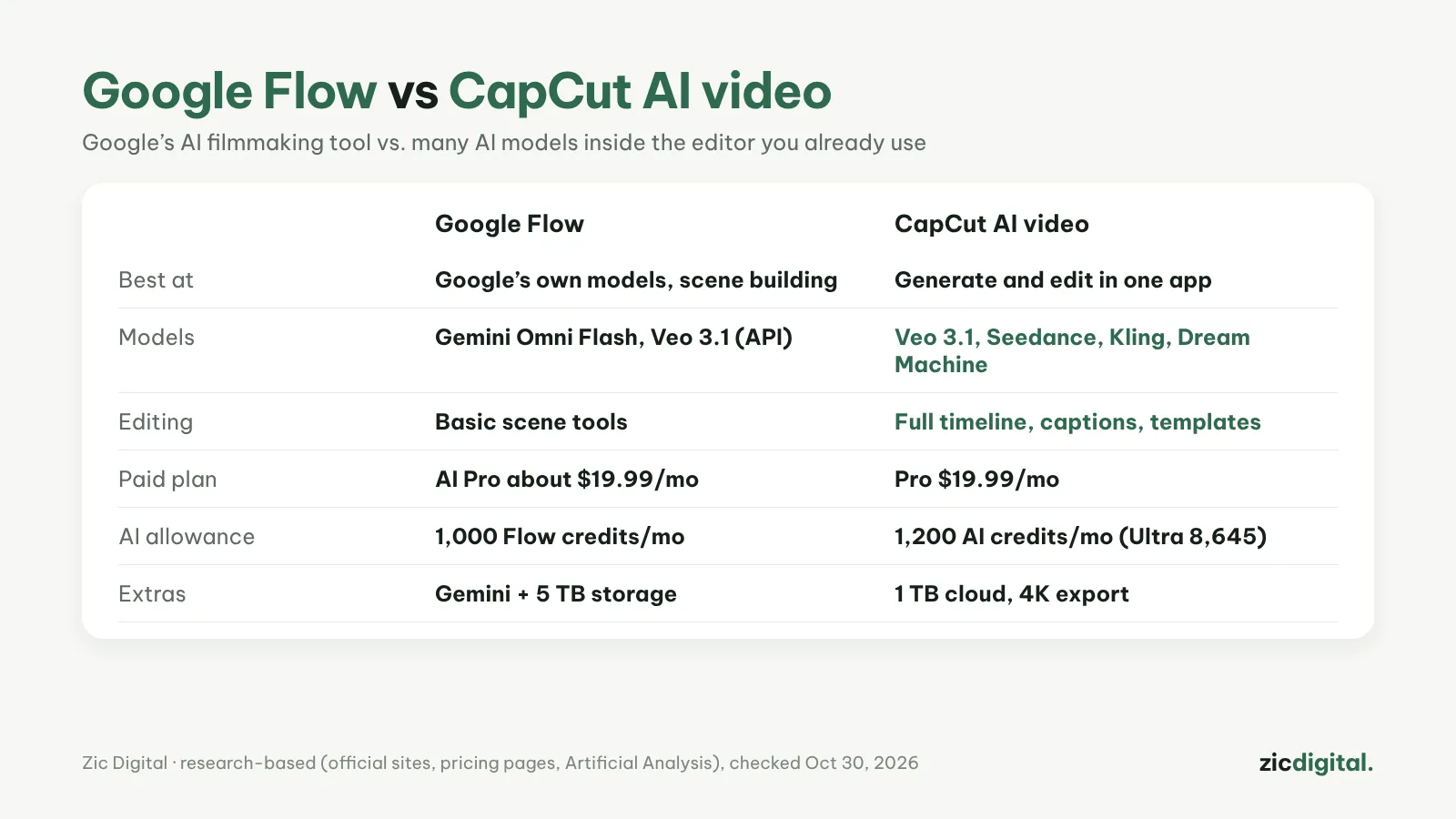
If you already edit Shorts in CapCut, you may not need another tool: CapCut’s models page (October 2026) lists Veo 3.1, Seedance, Kling, Dream Machine and more right inside the app. So when is Google Flow still worth it?
Choose Google Flow if
- You want Google’s own AI filmmaking tool and build scenes shot by shot
- You need Gemini and 5 TB of storage (included in AI Pro)
- You want Veo 3.1 through the API for bigger projects
Choose CapCut AI video if
- You already edit in CapCut and want to generate a shot and cut it right away
- You want to try several models (Veo, Seedance, Kling) with one account
- You need captions, templates and 4K export in the same place
Cost
Google AI Pro is about $19.99/month (US): 1,000 Flow credits, Gemini, 5 TB. CapCut Pro is $19.99/month: 1,200 AI credits a month, 1 TB cloud, 4K export; Ultra $79/month: 8,645 AI credits. Each model in CapCut uses a different number of credits, and some style controls are only in CapCut’s web editor.
Verdict
You use CapCut daily and want to generate and edit in one place: CapCut. You want a dedicated AI filmmaking tool and live in Google’s ecosystem: Google Flow. Before using CapCut for important content, read its terms on content rights.
Comparison based on official sites, pricing pages, the Artificial Analysis leaderboard and comparison sites, checked October 30, 2026 — no affiliate links.
Read more: Google Flow (Veo) review · CapCut review · CapCut Pricing 2026 · Is CapCut Safe? Privacy and Terms Every Creator Should Know · How to Make YouTube Shorts in CapCut, Step by Step