AI Video Free Plans, Watermarks and Commercial Use: 10 Tools Compared (2026)
A side-by-side look at the free plans, watermarks and commercial-use terms of 10 AI video tools: Google Flow, Kling, Dreamina, Wan, Hailuo, Runway, Luma, Firefly, HeyGen and Synthesia, plus how to avoid paying for the wrong plan.
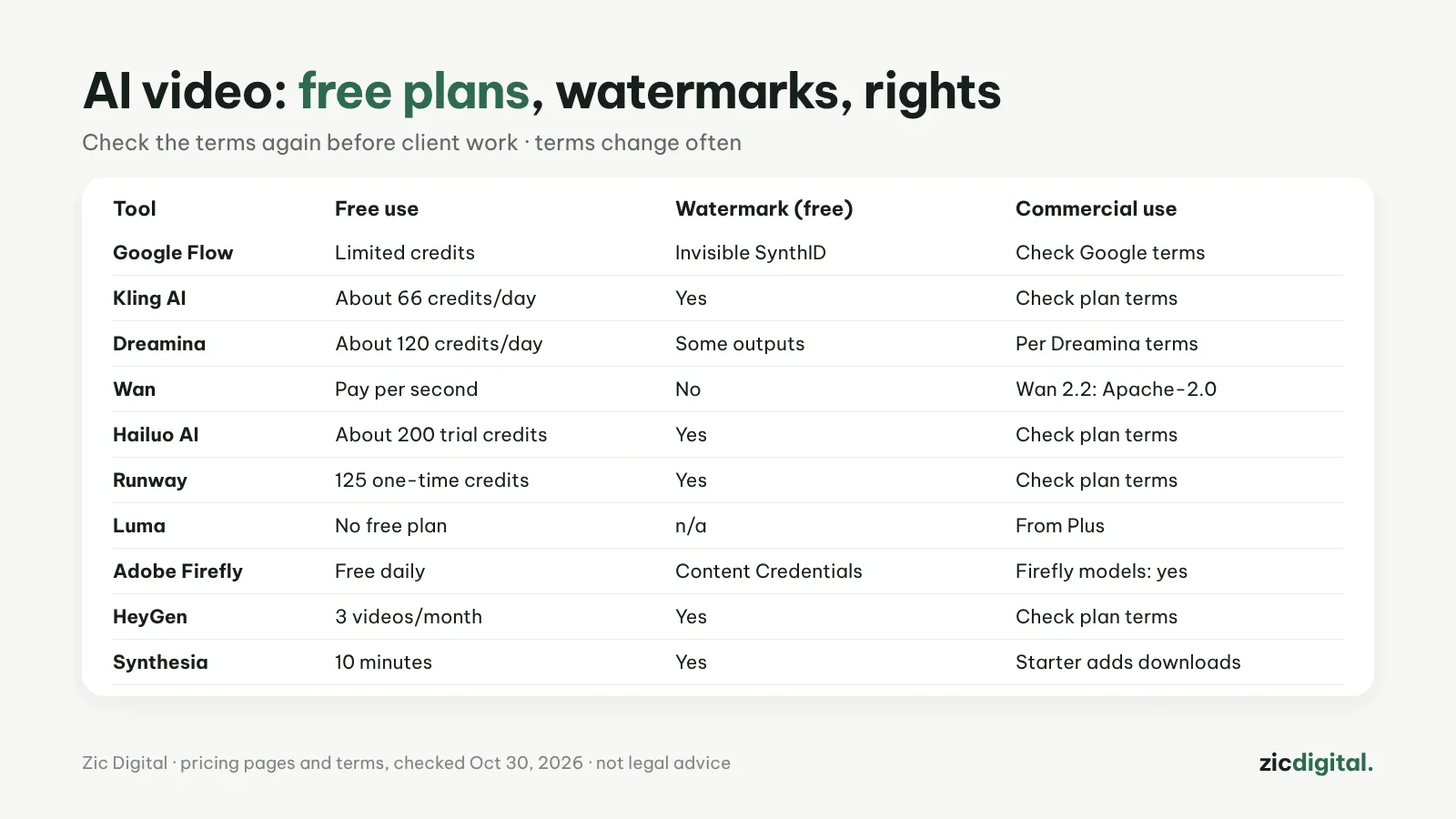
Before paying for an AI video tool, answer three questions: how much does the free plan give, will videos carry a watermark, and can you use them to earn money or for clients? The table below is compiled from pricing pages and terms on October 30, 2026; terms change often, so check again before client work.
1. What the free plans really give
Kling about 66 credits a day, Dreamina about 120 a day, Hailuo about 200 trial credits, Runway 125 one-time credits, Firefly daily generations, HeyGen 3 videos a month, Synthesia 10 minutes. Luma has no free plan; Wan is paid per second.
2. Watermarks
Free plans from Kling, Hailuo, Runway, HeyGen and Synthesia add a visible watermark. Google adds an invisible SynthID watermark to every Veo clip; Adobe attaches Content Credentials. Don’t use watermark removers: that can break the terms.
3. Commercial use
Usually only on paid plans, and every service words it differently. Luma states commercial use from Plus; Adobe says Firefly models are commercially safe (partner models aren’t covered); Wan 2.2 uses the open Apache-2.0 license.
4. What you upload
Some services take broad rights over the images and video you upload. Don’t upload a client’s unreleased footage before you’ve read the terms.
5. Pick a plan without wasting money
Test with free credits, buy monthly first, and only switch to yearly after 1–2 months of steady use. Monthly credits expire at the end of each period on many services.
Before you make videos for clients
- Screenshot the pricing page and terms on the day you create the video
- Prefer tools that state commercial rights clearly or offer IP coverage
- Keep prompts, reference images and source files as a record of your creative process
- Turn on YouTube’s AI disclosure if shots look realistic
Guide based on official help pages, docs and policies, checked October 30, 2026 — no affiliate links.
Read more: Can You Monetize AI Videos on YouTube? The 2026 Rules · How to Export and Upscale AI Video Clips for YouTube · Adobe Firefly review · Luma Dream Machine review · Is CapCut Safe? Privacy and Terms Every Creator Should Know · Free Video Editors With No Watermark in 2026 · 10 Best AI Video Generators in 2026