Best Free Auto Caption Apps 2026: CapCut, Premiere, Edits, Descript, Clipchamp
Five apps that auto-caption your videos, ranked by what you get for free, with a how-to for each.
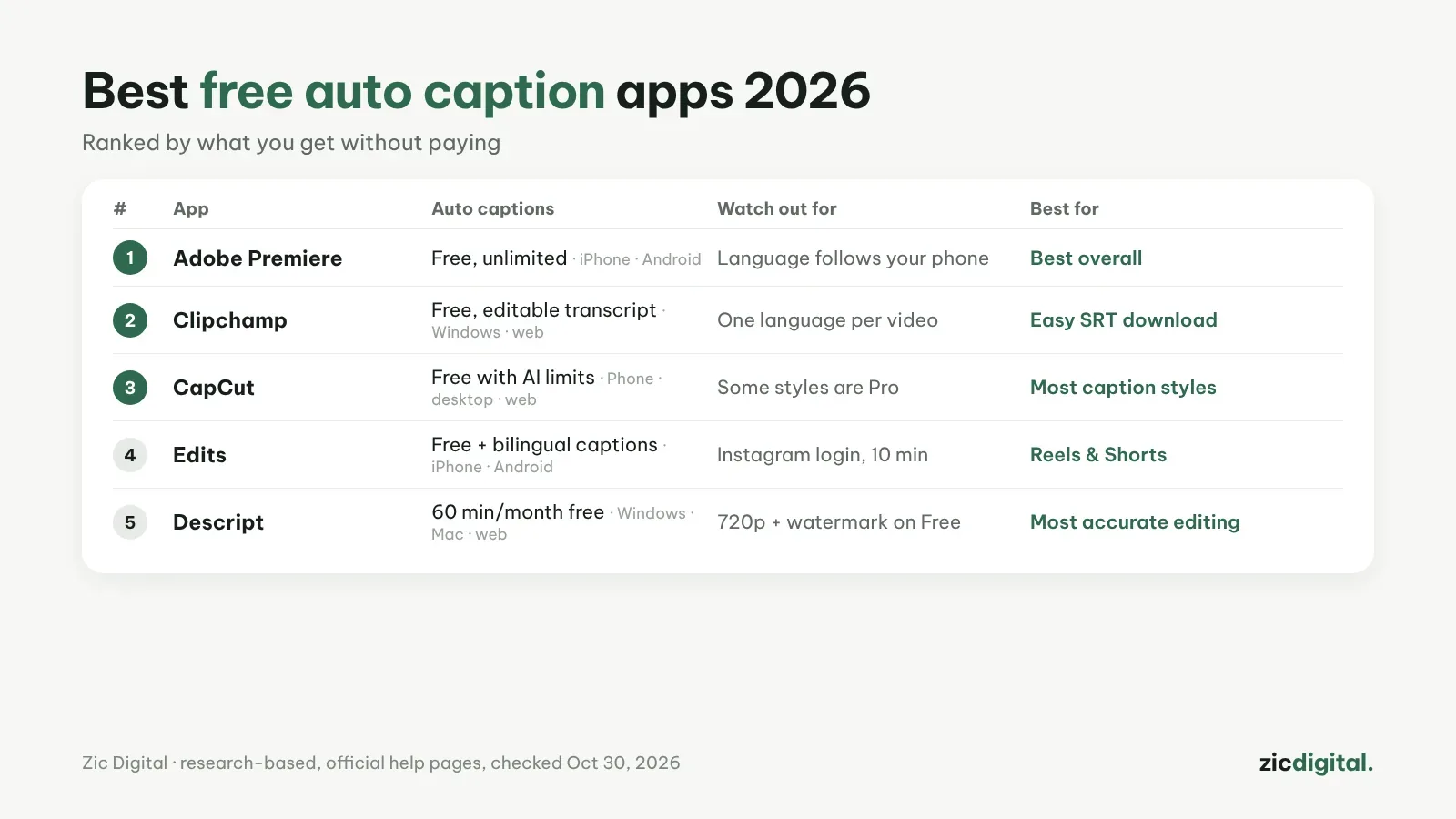
Captions make videos watchable with the sound off and easier to find. Here are five apps with auto captions, ranked by what the free version gives you.
1. Adobe Premiere (mobile) — free and unlimited
Unlimited auto captions and 4K export with no watermark. Language follows your phone settings.
Adobe Premiere review · How-to: captions in Adobe Premiere
2. Clipchamp — easy transcript fixes and SRT download
On Windows and the web; double-click to fix words and download an .SRT for YouTube. One language per video.
Clipchamp review · How-to: captions in Clipchamp
3. CapCut — the most caption styles
Lots of animated trend styles; the free plan has AI limits and some styles are Pro.
CapCut review · How-to: CapCut auto captions
4. Edits — bilingual captions for Reels
Bilingual captions that auto-translate into 15 languages. Needs an Instagram account; 10-minute projects.
Edits review · CapCut vs Edits
5. Descript — most accurate for talking videos
Edit video by text; captions follow the transcript. Free plan: 60 minutes a month, 720p with a watermark.
Descript review · How-to: editing by text in Descript
Quick pick
- Editing on a phone, completely free: Adobe Premiere
- Editing on Windows, need an SRT file: Clipchamp
- Want flashy captions: CapCut
- Posting Reels in two languages: Edits
- Podcasts and long talking videos: Descript
Pick by device: phones · Windows. All options: 8 best CapCut alternatives.
Based on official help pages and pricing, checked October 30, 2026 — no affiliate links.
See also: free video editors with no watermark
The full YouTube creator toolkit: YouTube Creator Toolkit 2026
See also: How to Make an AI Voiceover for YouTube with ElevenLabs